Backgrounds
Correct a sloping or offset background before fitting — using Box Delete, Box Exclude and Subtract Fit from the Context Menu to fit the baseline and remove it.
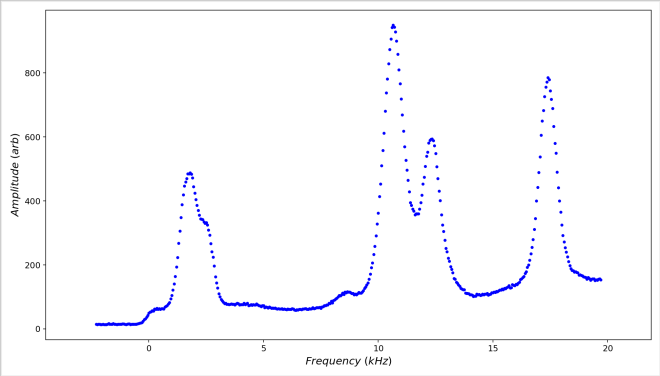
Take the graph above. It has both a baseline offset and a rising baseline, both due to measurement effects. To fit this graph well it helps to correct these issues first. Both adjustments can be made with tools from the Context Menu — specifically Box Delete, Box Exclude and Subtract Fit. Let’s assume we know the baseline rises in an approximately parabolic fashion with frequency.
01Isolate the baseline
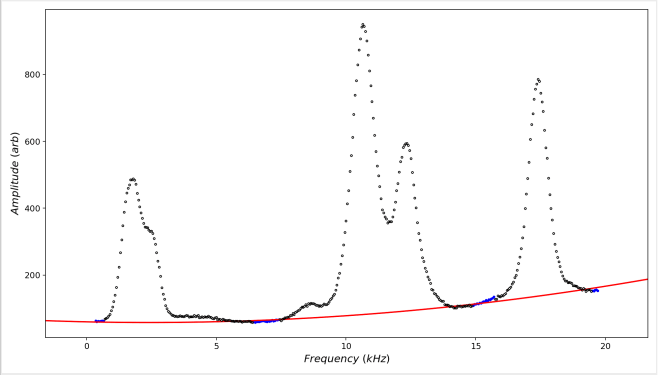
Here the data below y = 0 have been removed with the Box Delete tool, and then the Box Exclude tool has been used to exclude most of the data (the black circles), leaving the remaining active data (the blue dots) close to the minima between each feature. A 2nd-order polynomial has then been fitted to the active data.
Any suitable fit could be used, depending on the expected characteristics of the baseline — a higher-order polynomial, a power-law function, or any custom function — as long as it does not generate unjustified distortions in the data after subtraction.
02Subtract the fitted baseline
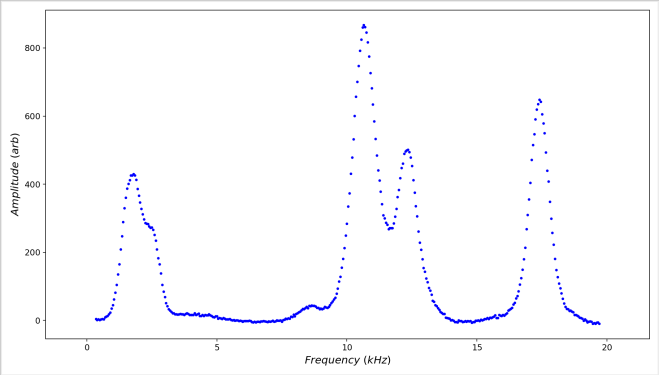
Finally, the Subtract Fit tool subtracts the baseline. This restores the excluded data (but not the deleted data) and subtracts the polynomial fit from all the data, leaving the full dataset with the background removed.
03Reversing the subtraction
Undoing a baseline subtraction. Once a fit has been subtracted, a Restore Data item replaces the Subtract Fit item in the Context Menu — choose it to put the original data back. (The separate Remove Fit Line item is unaffected.)

